Proofreading for Linux and macOS
Write without the drama.
GramaDrama fixes, polishes and translates what you write — in Polish and English, in any app. No subscription, and your text never goes to someone else's cloud: the model runs on a server you choose.
Ctrl + Alt + G in any text field. Enter and you're done.
 GramaDrama3 fixes
Grammarly, on your own terms
Good proofreading shouldn't need a subscription, or a tour of your emails through other people's servers.
Your server, your rules
A language model you pick does the work: Bielik on Ollama, llama.cpp, LM Studio or a cloud service. Your text goes only where you point it.
Zero subscriptions
No GramaDrama account, no plan and no word limit. At most you pay for your own computer's electricity.
Polish taken seriously
Bilingual by design: it detects the language of each sentence and never translates unless you ask. Diacritics, punctuation, typos — and the reason for every change.
How it works
Three moves, without leaving the window
GramaDrama has no editor of its own. It works in the field you are already typing in.
-
Write where you usually do
Chat, email, browser, text editor. Select a passage, or just put the cursor in the field.
-
Press Ctrl+Alt+G
On macOS: ⌥⌘G. A panel appears at the cursor showing the diff: struck through is removed, green is added, with a list of changes and reasons below.
-
Enter — drama over
The fix replaces your text in place and the app keeps focus. Esc cancels and changes nothing.
Features
More than “fix the comma”
One shortcut, several ways to work with your text.
Six modes
Switch how the model treats your text with a single key.
- Fix
- Polish
- Formal
- Casual
- Shorter
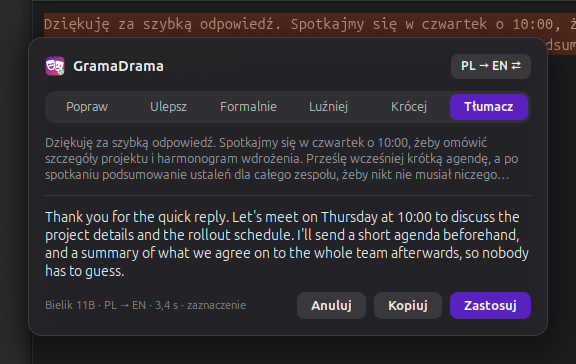
- Translate
PL ↔ EN translation
The direction follows the language of the text, and one shortcut flips it. Emoji, @mentions, links and code are left untouched.
Checking as you type
A badge in the corner of the field counts the mistakes. A dictionary checks spelling, LanguageTool checks grammar, and the model catches what only context reveals — in the background, after a short pause.
Dictation beta
Hold a key, speak, let go — the text lands at the cursor. Whisper does the recognition, running on your side rather than in someone's cloud.
A reason for every change
Diacritics, punctuation, typo, style. You see what changed and why, before you accept anything.
Editable prompts
The instructions for the model are plain files. Adapt them to your language, field and style; updates won't overwrite them.

Your data
Your text goes only where you send it
GramaDrama has no server, account or model of its own. It is a thin client between a text field and the services you choose.
- No default addresses. The first run asks for the address of your server.
- Standard protocols. An OpenAI-compatible server or Ollama, so you can swap the model whenever you like.
- Away from home, too. You can reach your own server from outside by signing in with a passkey (OIDC).
test sentences corrected exactly by Bielik 11B with examples in the prompt — and 0 false alarms on 9 sentences with no mistakes. Median 3 s on a small Jetson Orin NX (16 GB). This is the project's own test set, not an independent benchmark.
Status
Where it runs today
This is a hobby project, built for myself and for the community. Here is what is ready and what is not.
Linux (Ubuntu / GNOME)
An IBus input engine with a panel in GNOME Shell. Ubuntu 26.04, GNOME 50, Wayland. I am getting it ready for release.
macOS
The original version, written in Swift, living in the menu bar. To be released after Linux.
Android and other systems
Ideas, not promises. First I want the Linux version to be good for people other than me.
Open source. The code is meant to go into a public repository under GPL-3.0-or-later, Linux version first. Not yet, but it will be there.
GramaDrama on GitHubGet in touch
Questions, feedback, ideas, or an offer to help with testing — write to me.
info@gramadrama.app